
How to Automate Data Entry into Spreadsheets via Text: The Definitive Guide
02/11/2026
How to Automate Data Entry into Spreadsheets via Text: The Definitive Guide
Updated: February 11, 2026
Spreadsheets run the world — from small businesses and freelancers to global enterprises.
Yet despite living in an age of “real-time everything,” most spreadsheets are still days or weeks out of date.
Why?
Because updating them is painful.
This guide explains:
- Why spreadsheets fall behind
- The three main ways people try to update them from their phone
- And why text-to-sheet automation is emerging as the fastest, simplest solution
If you’ve ever forgotten to log a sale, expense, habit, or task… this is for you.
The Data Entry Gap: Why Your Spreadsheet Is Always Out of Date
There’s a hidden problem most people don’t notice:
The Data Entry Gap
This is the friction between a real-world event happening and
you sitting down later to enter it into a spreadsheet.
Examples:
- You make a sale → forget to log it
- You spend money → receipt disappears
- You complete a task → never tracked
- You promise yourself you’ll update the sheet tonight → you don’t
The longer the gap, the worse the data.
And bad data leads to:
- Wrong business decisions
- Missed insights
- Lost revenue
- Broken habits
To close this gap, people usually try one of three approaches.
Let’s break them down.
1. The Native Spreadsheet App Approach (The Clunky Way)
The most obvious solution is using Google Sheets or Excel mobile apps.
The advantages
- Free or low cost
- Full spreadsheet power
- Works offline in some cases
The real problems
1. Feature overload on a tiny screen
Mobile spreadsheet apps try to replicate desktop functionality — pivot tables, formatting menus, formulas — on a 6-inch display.
But when you’re on the move, you don’t need power tools.
You just need a fast way to log one line of data.
2. The “fat-finger” error problem
- Tiny cells
- Accidental deletions
- Broken formulas
- Wrong rows overwritten
One small mistake can corrupt an entire sheet.
3. High friction to enter a single line
To log one expense, you must:
- Unlock phone
- Open the spreadsheet app
- Wait for loading
- Find the correct file
- Navigate to the right tab
- Scroll to the bottom
- Tap the right cell
- Type carefully
That’s 8+ steps for one number.
Most people simply… don’t bother.
Verdict
Great for viewing or occasional edits.
Terrible for frequent real-time data entry.
2. DIY Automation Tools (The Expensive Way)
More technical users try to automate the process using tools like:
- Zapier
- Make
- Self-hosted n8n
- Custom scripts
The idea:
Send a message → automation parses it → updates Google Sheets.
Smart in theory. Painful in reality.
The downsides
1. Steep learning curve
You must understand:
- APIs
- Webhooks
- Authentication
- Data mapping
- Error handling
For non-developers, this is overwhelming.
2. Monthly costs add up
Typical pricing:
- Automation hosting: ~$25/month
- Zapier/Make plans: ~$20–$50/month
For just logging simple data, that’s expensive.
3. Fragile systems that break easily
Change a column header?
Rename a sheet tab?
Your entire automation can fail silently.
Now you’re debugging instead of working.
Verdict
Powerful for engineers.
Over-engineered for everyday users.
It’s like building a suspension bridge…
when all you needed was a stepping stone.
3. Chat2Sheet (The Smart Way)
A newer approach removes the spreadsheet interface entirely.
Instead of opening an app…
You simply send a text message.
That’s where Chat2Sheet comes in.
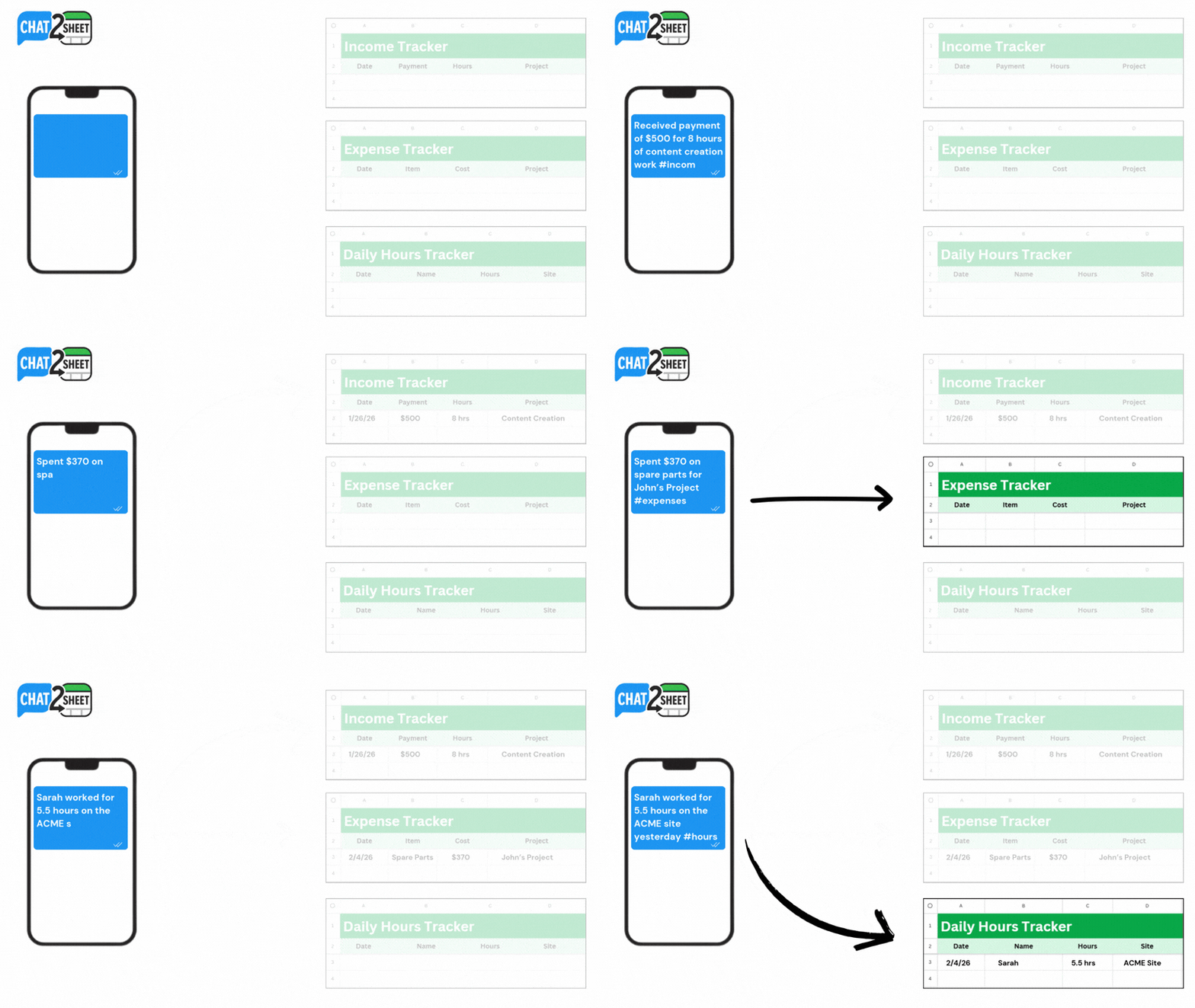
Chat2Sheet turns everyday messaging into a direct input layer for your spreadsheet.

Why this changes everything
1. Natural language instead of cell navigation
Just type:
“Sold 3 soaps for $45”
“Paid $120 for supplies”
“John worked 5 hours today”
AI automatically:
- Understands intent
- Extracts numbers, names, and dates
- Places them into the correct columns
No formatting.
No formulas.
No thinking about cells.
2. Fast enough to match real life
Logging data now takes:
~5 seconds.
Which means you actually do it.
And consistency is what makes data valuable.
3. Voice-first, hands-free entry
Because it works through chat apps:
- Send voice notes
- Log data while driving
- Update sheets without touching a keyboard
This is impossible with traditional spreadsheet apps.
4. Schema-aware and self-adapting
Spreadsheets evolve.
New columns get added.
Data structures change.
With traditional automations, this usually breaks everything and requires manual reconfiguration.
Chat2Sheet is designed differently.
It intelligently understands your sheet’s structure — including newly added columns — and continues logging data correctly without requiring setup changes, remapping, or technical fixes.
Your spreadsheet can grow naturally, and Chat2Sheet grows with it.
5. Zero learning curve
If you can send a message…
You already know how to use it.
No onboarding.
No tutorials.
No setup headaches.
Step-by-Step Guides to Get Started
If you're ready to automate your own spreadsheet workflow, start here:
-
Skip the spreadsheet entirely — track on a live dashboard →
Text-to-Dashboard: Track Anything With a Live Dashboard You Update by Text -
Connect Telegram to Google Sheets →
How to Sync Telegram Messages to Google Sheets Automatically -
Set up your full system in minutes →
Ultimate Setup Guide -
Log entries hands-free using voice →
How to Update Google Sheets Using Only Your Voice -
Manage multiple sheets from one chat →
How to Manage Multiple Google Sheets from a Single Chat -
Build a lightweight mobile CRM →
How to Build a Mobile CRM Using Telegram and AI
Why Text Is the Best Interface for Data Entry
This shift isn’t just about convenience.
It’s about changing the interface layer of spreadsheets.
1. No new UI to learn
Every productivity app introduces:
- Buttons
- Menus
- Workflows
- Training time
Text has zero learning curve.
Humans are already fluent.
2. AI becomes your data assistant
Traditional spreadsheets make you do the parsing:
- Which column?
- What format?
- Where does this number go?
With AI-powered text entry:
The machine does the thinking.
You just describe reality.
3. Continuous real-time logging
Because chat is always open:
- Entries happen instantly
- Nothing is forgotten
- History is automatically preserved
This creates true real-time data
— something most spreadsheets never achieve.
Real-World Use Cases
Text-to-sheet automation is especially powerful for:
Small business owners
Track:
- Sales
- Expenses
- Orders
- Inventory
Without opening a spreadsheet.
Freelancers & consultants
Log:
- Hours worked
- Client payments
- Project costs
In seconds.
Personal productivity
Monitor:
- Habits
- Workouts
- Spending
- Daily goals
With zero friction.
Real-World Ways People Use Chat2Sheet
See how different professionals use conversational data entry:
- Real estate agents tracking leads between showings
- Contractors logging materials on job sites
- Freelancers preparing for tax season effortlessly
- Airbnb hosts monitoring maintenance costs
- Trainers tracking client progress in real time
- Sales professionals updating pipelines instantly
- Resellers organizing thrift inventory
- Creators capturing content ideas on the go
- New parents logging baby routines gently
Explore all real-world examples in the Use-Cases section of the blog.
The Future of Spreadsheets Is Conversational
For decades, spreadsheets required:
Humans adapting to software.
Now, AI allows:
Software adapting to humans.
Text-based data entry is the first step toward:
- Conversational analytics
- AI-generated reports
- Voice-driven business tracking
- Fully automated personal dashboards — already here, and updated by text
This is bigger than convenience.
It’s a new interface paradigm.
Conclusion: Close the Data Entry Gap
Spreadsheets are incredibly powerful.
But power is useless without accurate, timely data.
The real problem was never spreadsheets.
It was the friction of updating them.
By moving data entry from:
cells → to chat
you eliminate that friction entirely.
You close the Data Entry Gap.
And once data becomes effortless to capture…
everything else becomes easier to improve.
Start Chatting With Your Spreadsheet
If you want to:
- Stop forgetting to log important data
- Update sheets in seconds instead of minutes
- Turn everyday messages into structured information
Try Chat2Sheet.
Because the fastest way to update a spreadsheet…
isn’t typing into cells.
It’s sending a text.