Chat2Sheet vs. Zapier: The Easiest Way to Automate Your Spreadsheet
2026-02-11
Chat2Sheet vs. Zapier: The Easiest Way to Automate Your Spreadsheet
If you’ve searched for ways to automate Google Sheets, you’ve probably discovered tools like Zapier or Make.
They’re powerful.
They’re flexible.
And for many small business owners…
They’re overkill.
This guide compares traditional automation tools with a new AI-powered approach to spreadsheet data entry — so you can decide which method actually fits real life.
If you’re new to text-based spreadsheet automation, start here:
→ How to Automate Data Entry into Spreadsheets via Text
Why Spreadsheet Automation Usually Fails
Most people don’t fail because automation is impossible.
They fail because the tools are too complex for the problem.
Traditional platforms require you to:
- Create triggers
- Map individual fields
- Configure webhooks
- Maintain integrations
- Debug silent failures
And if you change one column name in your Google Sheet…
Your entire automation can break.
That’s not automation.
That’s ongoing maintenance.
The Zapier Approach
Zapier and similar tools are designed for complex multi-app workflows, not quick real-world data entry.
Typical experience
- Setup time: 45–60 minutes
- Requirements: Understanding triggers, webhooks, and field mapping
- Flexibility: Low — inputs must follow strict formats
- Maintenance: High — small sheet changes can break the workflow
For engineers and operations teams, this can be powerful.
For freelancers, shop owners, and solo founders…
It’s usually too much friction.
The Chat2Sheet Approach
Chat2Sheet was built for a different reality:
Real-world data is messy, fast, and happens away from a keyboard.
Instead of configuring workflows, you simply send a message.
Typical experience
- Setup time: ~2 minutes
- Requirements: A connected Google Sheet + Telegram
- Flexibility: High — send text, voice notes, or informal language
- Maintenance: Minimal — AI adapts even if your sheet structure evolves
No triggers.
No field mapping.
No debugging automation flows.
Just log data instantly.
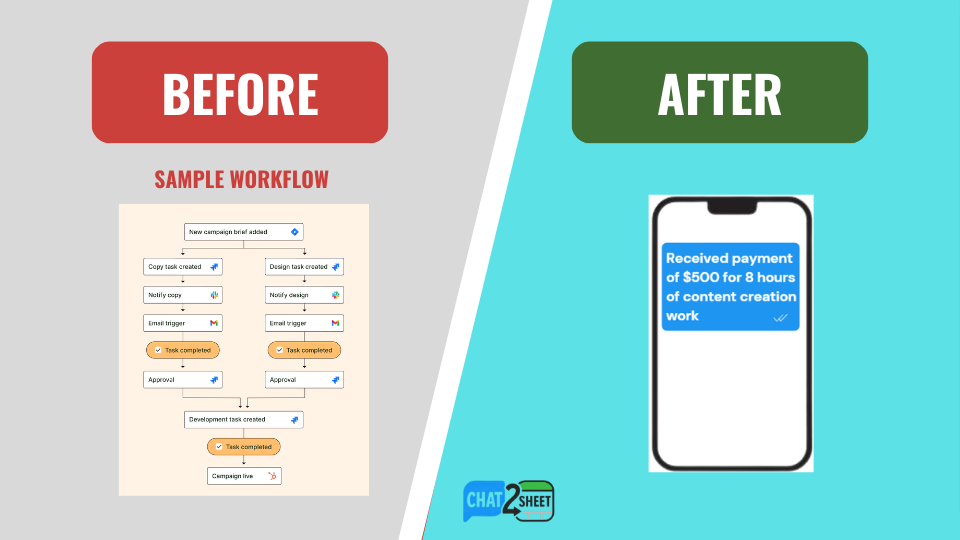
The Real Difference: AI Mapping vs Field Mapping
The biggest shift isn’t speed.
It’s who does the thinking.
Zapier: You map the data manually
You must define:
- Which field receives the amount
- How dates are formatted
- What counts as valid input
- How errors are handled
Every rule must be configured in advance.
Chat2Sheet: AI understands the intent
You can write:
- “50 bucks”
- “$50 today”
- “Spent fifty on gas”
Chat2Sheet automatically:
- Extracts the amount
- Detects the date
- Places data in correct columns
- Logs a clean spreadsheet row
No rigid syntax.
No predefined format.
Just natural language → structured data.
When Zapier Still Makes Sense
To be fair, Zapier is excellent for:
- Complex multi-step workflows
- Enterprise integrations
- Backend operational automation
- Cross-app syncing between dozens of tools
If your use case involves many systems talking to each other,
Zapier is still a strong choice.
When Chat2Sheet Is the Better Fit
Chat2Sheet shines when the goal is simple:
Log real-world data into Google Sheets quickly and consistently.
Best use cases:
- Tracking sales on the go
- Logging expenses instantly
- Recording work hours
- Capturing leads in real time
- Updating sheets via voice notes
If the main problem is manual data entry friction,
AI chat entry is dramatically faster.
The Bigger Shift: From Automation to Conversation
Traditional tools automate systems.
AI-powered chat tools automate human behavior.
That’s a fundamental difference.
Instead of forcing you to:
- Open apps
- Follow formats
- Maintain workflows
Chat2Sheet lets you:
Describe reality in plain language — and let AI handle the spreadsheet.
This is the beginning of conversational data entry.
And it’s why simple tools are starting to outperform complex automation stacks for everyday business tracking.
See Chat2Sheet in Action
Want to experience the simpler approach?
-
Set up your system in under two minutes →
Ultimate Setup Guide -
Log data instantly using voice notes →
How to Update Google Sheets Using Only Your Voice -
Connect Telegram directly to Google Sheets →
How to Sync Telegram Messages to Google Sheets Automatically
These guides show why AI-native data entry beats traditional automation tools.
Final Verdict
Zapier:
Powerful, flexible, but complex and maintenance-heavy.
Chat2Sheet:
Simple, fast, AI-driven, and designed for real-world data entry.
If your goal is complex system automation, Zapier wins.
If your goal is logging data effortlessly into Google Sheets, Chat2Sheet is dramatically easier.
To understand the full shift toward text-based spreadsheet automation, read the complete guide:
→ How to Automate Data Entry into Spreadsheets via Text
Ready to Skip the Setup?
Stop configuring workflows.
Start sending messages.
Chat with your spreadsheet — and let AI handle the rest.